We Built a Cloud AI to Identify Hearing Aids. The Phone Did It Better.
How Recycled Sound recognises a donated hearing aid on-device in seconds - and why we retired the cloud pipeline we started with.
By the Enspyr Team
TL;DR: Recycled Sound collects donated hearing aids and gives them to refugees and low-income residents who can't afford them. The hard part isn't the giving - it's that a donated aid arrives as anonymous plastic the size of a coffee bean, with a model name printed on it in letters smaller than a full stop. So we built a scanner. We built the obvious version first: send the photo to the cloud, run CLIP and Google Vision, get an answer back. It worked. Then we moved the entire brain onto the phone, and it got faster, cheaper (literally $0/month at rest), and more accurate - because the printed text, read locally, beat the fancy visual model. The twist that made it possible: OCR accuracy isn't monotonic in how far you zoom. Here's the real architecture, and the wrong turn we're glad we took.
A volunteer audiologist is holding a used hearing aid up to a phone in a church hall in Greater Dandenong. It's smaller than her thumbnail. Somewhere on its curved plastic shell is a model name, and on that name hangs everything: whether it takes a size-312 battery or charges on a dock, whether it can be tuned remotely or only in a clinic, whether it's right for the specific person who has been waiting three months for it.
Get it wrong and you haven't just wasted a device. You've broken a promise to someone with very little margin for broken promises.
That's the problem Recycled Sound exists to solve, and it's why the hero feature isn't the donation form or the matching engine. It's a scanner - a Google-Lens-for-hearing-aids that reads the tiny label and pre-fills a 26-field clinical record, so a handful of volunteers giving their evenings can turn a shoebox of anonymous plastic into a register of fitted, ready devices.
Claude and I have been building it for a few months. This is how it actually works - including the part where we built the wrong thing first.
The shape of the whole thing
Before the interesting bit, the map. Four kinds of people, two apps, one backend that holds the truth, and some cloud functions off to the side.
 Volunteers scan on the phone; audiologists and admins curate on the web; both meet only in Firebase. Note the dashed line - hold that thought.
The two apps are genuinely different programs built from one codebase. The mobile app is a scanner a volunteer points at a device. The web app is a spreadsheet-with-superpowers where an audiologist reviews what the scanner found. They never talk to each other directly, only through the backend. That separation is doing a lot of quiet work: the volunteer's job is capture, the clinician's job is decide, and the architecture refuses to blur them.
The obvious version, which we demoted
Here's the honest part. The first scanner was a cloud scanner, and on paper it was the sophisticated choice.
Two Cloud Functions did the thinking. A Python one turned a photo into a 512-number "visual fingerprint" using OpenCLIP - the same family of model that powers image search. A TypeScript one ran Google's Vision API for labels and text. The phone snapped a picture, sent it up, and got an answer back. It was the kind of architecture that looks great in a diagram and demos beautifully.
Then we moved the whole thing onto the phone and turned the cloud into a fallback.
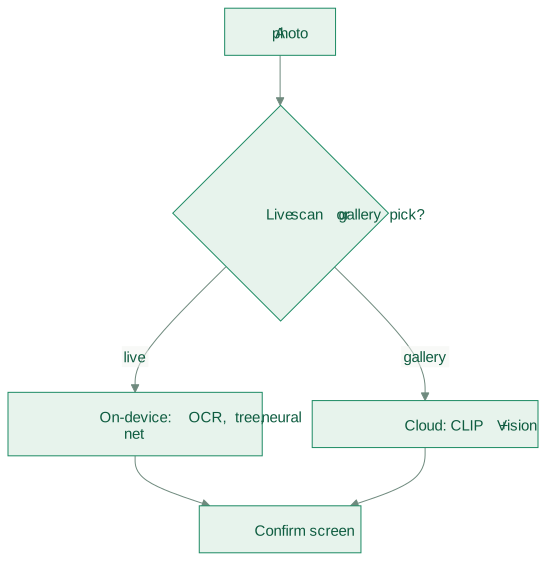 A live scan never touches the network. The cloud functions only run for the rare case of a still picked from the gallery, where there's no live detection to work with. Both roads end at the same confirmation screen.
Why demote a working cloud pipeline? Three reasons, and they turned out to be the whole moral of the project.
Speed. A network round-trip is seconds you don't have when someone is holding a fiddly device up to a camera in bad light. On-device is instant.
Cost. A charity's cloud bill, at rest, should be zero. The Python function's own source comment says it out loud: on-device cosine-similarity search against bundled fingerprints is "$0/month infrastructure." We took that literally.
The domain gap - and this is the one that actually mattered. The visual-fingerprint model was trained on clean product photos: studio lighting, white background, perfect angle. Real photos are hand-held, half-occluded by fingers, and lit by a fluorescent tube. It turned out that the printed text - read locally, off the label - was simply the stronger signal. So the architecture followed the evidence: OCR-first, with the visual model kept only for the label you genuinely can't read.
We didn't delete the cloud brain. We kept it exactly as big as it deserved to be. That's rarer than it should be.
What actually runs now
Open the scanner, hold a device in frame, and somewhere between one and five seconds later seven fields have filled themselves in - brand, model, style, tubing, power, battery, colour. Here's every stage of that, in order, all of it on the phone.
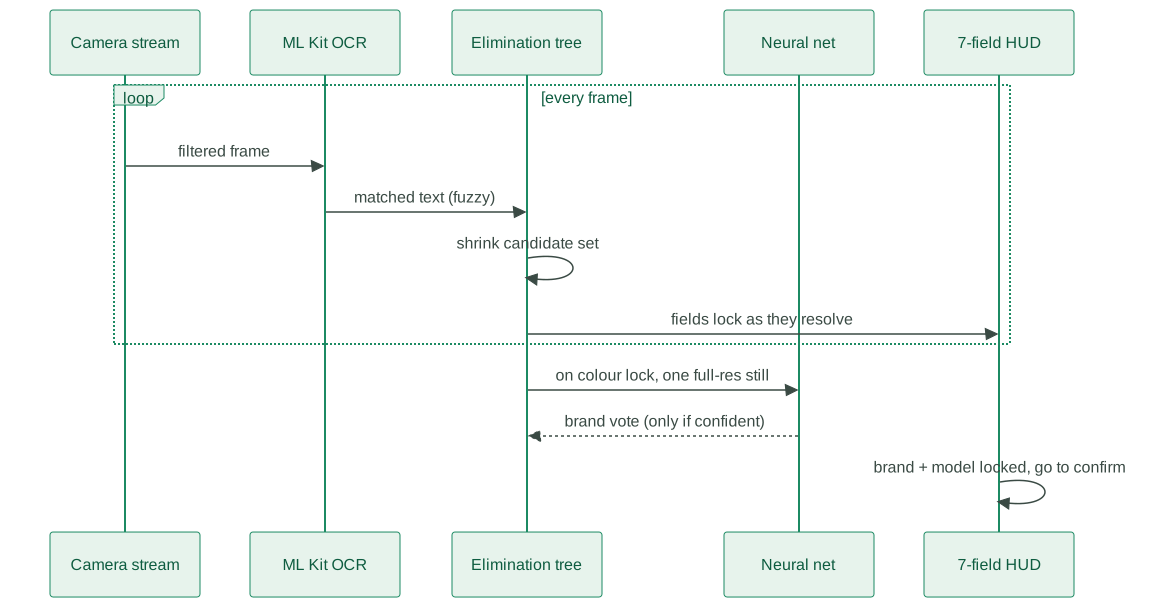 A tight per-frame loop does the work; the heavier neural net fires once, on a single full-resolution still, only after the colour detector settles. Nothing waits on the network.
It reads the label. Every camera frame runs through a small filter - cycling raw, contrast-boosted, and high-contrast versions, because a label that's illegible under one is crisp under another - then Google's ML Kit text recogniser, running on the phone. No upload.
Which brings me to the measurement that quietly saved the whole approach:
OCR accuracy is not monotonic in how much you zoom. Crop in tighter and a label the recogniser nailed at 60% can vanish at 80%, then reappear at 85%. There's a dead-band. So instead of guessing one crop, the certifier reads the label at several scales at once - a "crop pyramid" from about 35% to 85% - and takes the best hit. A well-chosen pyramid of native crops beats any single crop, and beats naively upscaling the image. That one finding is what made "identify on the phone" viable at all.
It turns text into suspects. Tiny labels and shaky cameras mean the OCR is misspelled more often than not - "oticon" comes back as "oricon", "moxi" as "movi". So the matcher does fuzzy, edit-distance matching, and can even run backwards: spot a model name and infer the brand, even when the brand word never survived the camera.
Then it eliminates. This is the cleverest and least obvious part. Picture the whole catalogue of hearing aids as a room full of suspects. Every clue - a matched brand, a legible model, a detected colour - doesn't pick a device, it rules out the ones that don't fit. When one candidate is left for a field, that field locks itself, and locked fields cascade: pin the battery and the power type often follows for free.
It ranks its clues by trust - a clear text read outranks a hesitant neural-net guess - and won't let weak evidence overturn a lock. But it isn't stubborn: if the same contradicting value shows up two frames running, it treats that as a real correction and re-opens the field. Confidence with a backspace key.
And only then, the neural net. For worn or blank labels, the app ships a trained network - a 4.7 MB TensorFlow Lite model - that guesses the brand from what the device looks like. It's expensive relative to a frame filter, so it fires exactly once, on a single full-res photo, and only if it clears a confidence bar. A tie-breaker, not the star.
The constraint that shaped every decision
Here's the thing an outsider would never guess from the feature list: the camera pipeline is single-threaded. Every pretty animation, every extra filter, every eager neural-net call competes with OCR for the same frames.
Early on, detection took fifteen seconds, and the reason was visual polish quietly eating the frame budget. The rule we live by now is blunt: detection throughput is sacred. You don't add anything to the per-frame loop without measuring the milliseconds it costs. That's why the neural net runs off the hot path, and why colour detection doesn't even start until OCR has seen some text. The elegance is in what we refuse to run.
Recycled hardware, recycled data
Identifying a device is only half the point. The other half is photographing it - both to document the physical item and to feed the next model. And here's where a subtle idea earned its keep.
For a long time, the photos and the labels lived on two different roads. You could scan-and-confirm (a rich label, no photos), or capture-photos-for-later (14 images tagged with nothing but a box number and a guess). Pull the photo bucket and you got "fourteen angles of box C25, maybe an Oticon" - useless as training data.
So we made the label travel with the pixels.
 The confirmed label rides into the photo session, so every bundle lands as ground truth - not a box number. Recycled hardware producing recycled data, training a better model, shipping in the next build. The loop closes.
Now every captured device carries the audiologist's confirmed make, model, style and battery - and a link back to the original scan. The donated aids don't just get a second life in someone's ear. They quietly train the thing that will recognise the next one.
The line we won't cross
We've spent this whole post on machinery that reads labels, eliminates suspects, runs neural nets, and matches devices to people. So it's worth ending on the one rule that overrides all of it:
No automated system ever touches a recipient.
The recipients are refugees and asylum seekers. For them, a wrong device or a mishandled message isn't a bad user-experience - it's a real harm to someone with almost no margin. So the scanner, for all its cleverness, is explicitly a co-pilot. It pre-fills; the audiologist confirms. It can suggest a match; a human approves it. Matching starts fully manual - the system only ever notifies. Every recipient-facing step is human-mediated by design, and stays that way until the manual version has been proven safe.
A device travels a long way from a donation box to someone's ear, and the record knows exactly where it is at every step:
 The scanner only creates the record at the very start, at "donated". Everything downstream of "ready" - matching, shipping, the moment it's fitted and working - is run by people. The AI's whole job lives in that first hop.
That's the quiet engineering decision underneath the flashy one. The hard part was never teaching a phone to recognise a hearing aid, impressive as that is. The hard part was building all that power and then drawing a firm line around where it's allowed to act alone.
The AI removes the tedious reading. The human keeps the deciding.
The One-Sentence Version
The best place to run our hearing-aid AI turned out to be a phone in a volunteer's hand, not a server in the cloud - and the best thing we did with all that intelligence was decide exactly where it wasn't allowed to go.
Recycled Sound is a community initiative of the Rotary Club of Springvale City and Arches Audiology, collecting, servicing, and redistributing donated hearing aids in Greater Dandenong, Victoria. Built with Flutter, Firebase, and a stubborn preference for on-device machine learning.